BackCase study
AI email triage
A prototype that sorts a clinic inbox, drafts replies and learns from staff edits.
- Role
- Sole developer
- Team
- Solo
- Timeline
- 3 weeks, March 2026
- Stack
- Next.js, TypeScript, Llama 3.3 via Groq, Zod, Vitest
- Reading time
- 4 min
TL;DR
- Problem
- Some emails were slipping through the gaps in the clinic’s shared inbox, which mixes new injuries, questions for therapists, admin and spam. A few of those emails describe symptoms that need a doctor, not a physio appointment.
- What I did
- I built a prototype that sorts each email into Priority, Therapists, Admin or Spam, explains why, drafts a reply and learns from the edits staff make. Built-in rules sort the email; with a Groq key, an AI model (Llama 3.3) sorts and drafts from the clinic’s handbook instead. A safety check runs on every email, whichever sorter is used.
- Result
- The built-in rule-based sorter put all 12 labelled test emails in the right folder on repeated runs, including every urgent-symptom email and the cases built to trick a keyword filter. A working prototype, tested on sample emails; it never went into daily use.
Context
Some emails were slipping through the gaps in the clinic’s shared inbox, so I built a tool to sort and prioritise them. I built it over three weeks in March 2026, for a physiotherapy clinic in Dublin. The version I built for the clinic pulled email from Outlook and stored it in Supabase.
It is a working prototype, tested on sample emails. It was never adopted for daily use.
The public demo keeps the sorting, safety and learning logic and replaces the mailbox with sample and test emails, so anyone can run it without access to real patient data. It runs without an AI key, so the built-in rules do the sorting there; the badge at the top of the app says which sorter is running. The clinic in the demo, Northbank Physio, is fictional, and every patient and email is made up.
Two constraints shaped it:
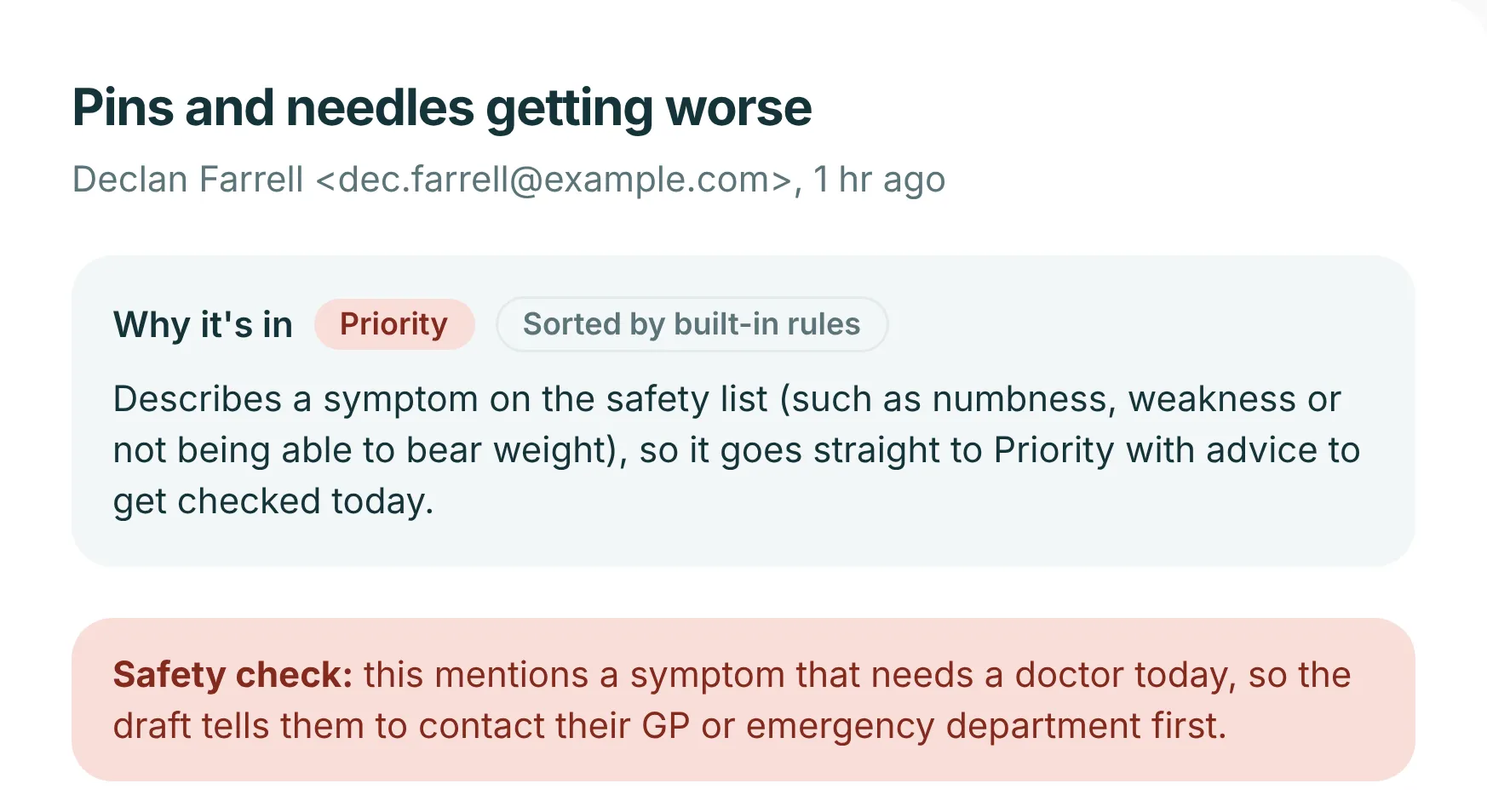
- It’s a health setting. New numbness or weakness, chest pain, bladder or bowel changes, or not being able to bear weight need a GP or an emergency department. Offering those patients a physio slot would be the wrong answer.
- Staff stay in charge. The assistant drafts; a person reads, edits and sends.
Decisions
AI first, rules as the fallback, safety check always
Instead of: Trusting the model on its own
When a key is configured the AI model sorts the email. If there’s no key, or the model errors, times out or returns something invalid, a built-in rule-based sorter does the work instead, so the inbox always gets sorted. The red-flag check runs whichever sorter was used.
Validate the model’s answer
Instead of: Guessing at a malformed reply
The answer is parsed and validated with Zod. Near-miss folder names such as “Therapists” or “ADMIN” are mapped onto real folders. Anything else is rejected and the rules take over.
Urgency needs a symptom
Instead of: Treating “urgent” or “today” as urgent by themselves
Urgency words only push an email towards Priority when there is also a symptom. That stops “URGENT: invoice overdue” being flagged as a clinical emergency.
Replies only use facts from the handbook
Instead of: Letting the model supply prices, times or policies
The prompt gives the model the clinic’s handbook as the only facts it may use. The handbook is editable in the app, so changing a price or an opening time changes future drafts.
Spam never gets a reply
Instead of: Sending whatever the model drafted
Even if the model wrote a draft for a spam email, it is discarded.
Learn from what staff change
Instead of: A fixed prompt
When staff edit a draft before sending, the assistant works out what they added and saves it as a rule under “Learned from your edits” in the handbook, and future AI drafts follow it. Learning works without the AI model too, but only AI drafts use the learned rules: without a key, the built-in sorter writes its own stock replies.
Hardest problem
The emails that are hard to sort are the ones where the tone and the content disagree. The demo’s test set includes four on purpose:
- “URGENT: invoice overdue” uses the word urgent but belongs in Admin.
- “My back is loads better, please cancel” mentions pain but is a cancellation.
- A chatty message about parking that also mentions a numb foot is a safety issue and goes to Priority.
- A polite “partnership opportunity” is SEO spam.
A model can get any of these wrong, and one of them matters far more than the others. So the safety check does not depend on the model:
Sort with the built-in rules
Always computed first, so there is an answer whatever happens next.
No AI key. Use the rules result.
Ask the model
Llama 3.3 through Groq, given the handbook and the rules learned from staff edits.
Error or timeout. Use the rules result.
Validate the answer
Parsed with Zod. Near-miss folder names are mapped onto real ones.
Invalid. Use the rules result.
Run the red-flag check
On the subject and body, whichever sorter was used.
Red flag, but not in Priority. Overrule the model. Priority, and the reply says to contact a GP or emergency department first.
Return folder, reasoning and draft
Staff see why it landed there and can edit anything before sending.
The public demo runs without a key, so it leaves at the first step: the rules sort every email, and the red-flag check still runs. With a key, the whole policy fits in one function:
export async function triageEmail(
  email: { from: Sender; subject: string; body: string },
  handbook: string,
  rules: LearnedRule[] = [],
): Promise<Triage> {
  const rulesResult = sortWithRules(email);
  if (!aiEnabled()) return rulesResult;

  try {
    const ai = await sortWithAi(email, handbook, rules);
    if (!ai) return rulesResult;

    const redFlag = hasRedFlag(`${email.subject}\n${email.body}`);
    if (redFlag && ai.folder !== "priority") {
      // The model missed a safety symptom. Trust the safety check instead.
      return rulesResult;
    }
    return { ...ai, redFlag };
  } catch (err) {
    console.error("AI triage failed, using rules:", err instanceof Error ? err.message : err);
    return rulesResult;
  }
}email-triage-demo/src/lib/triage/index.tsResults
- The built-in rule-based sorter put all 12 labelled test emails in the right folder on repeated runs, including every urgent-symptom email and the cases built to trick a keyword filter. This is the sorter the public demo runs.
- 37 tests pass, covering the sorter, the safety check, parsing of the model’s answer and learning from edits.
- One test checks that every test email and sample email lands in its expected folder, so a change to the sorter that breaks a case fails straight away.
- The demo runs with no API keys: without one, the rule-based sorter does the work.
- It is a prototype: it has been tested on sample emails, not used day to day.
Reflection
It worked on test emails but never went into daily use. Next time I’d agree with reception how they’d use it and run a small pilot before building.